Most MCP servers are written as standalone processes. One API key, one tenant, a list of tools, and you're done. Putting an MCP server inside an existing multi-tenant SaaS product is a different job. Users sign in with the accounts they already have. Each user sees only what their roles allow. Long agent runs have to survive client timeouts. An administrator has to be able to switch tools off without a redeploy. And because Claude or any other MCP client is now a third way into your data, after the web UI and the API, every rule those two enforce has to hold here too.
This article covers how we built the MCP server inside Connect, the AI platform we built on top of Syncify for construction scheduling. It serves about two hundred tools to Claude and other MCP clients over Streamable HTTP, with Connect acting as its own OAuth 2.1 authorization server. Our other MCP articles cover different ground: gateways in front of many servers, giving construction agents MCP tools and what MCP is. This one is about building the server inside the app.
The shape: one module, one gate, many registrars
The server lives in one capability module. The first set of roughly seventy tools is registered inline. The rest come from about two dozen small registrar files, grouped by capability: schedules, baselines, Updates, Means & Methods, files and uploads, apps, alerts, programs, members, and so on. All of them call the same capability modules the HTTP routes call. None of them touch a data store directly. That's the same layering rule the rest of the codebase follows, and an architecture test enforces it.
Each MCP session gets its own server instance, built for one signed-in user and one granted scope. Read tools are registered only when the token carries mcp:read. Write tools are registered only with mcp:write. A read-only token never sees a write tool in the list, so it can't call one.
OAuth 2.1, reusing the login you already have
Connect is its own authorization server for MCP. That spared us from registering every possible MCP client with an outside identity provider, and it means the consent step runs on the same login screen and session cookie as the web app. A user adds the connector URL in Claude, a browser window opens, they sign in as they always do, and that's it. Nobody has an API key to copy.
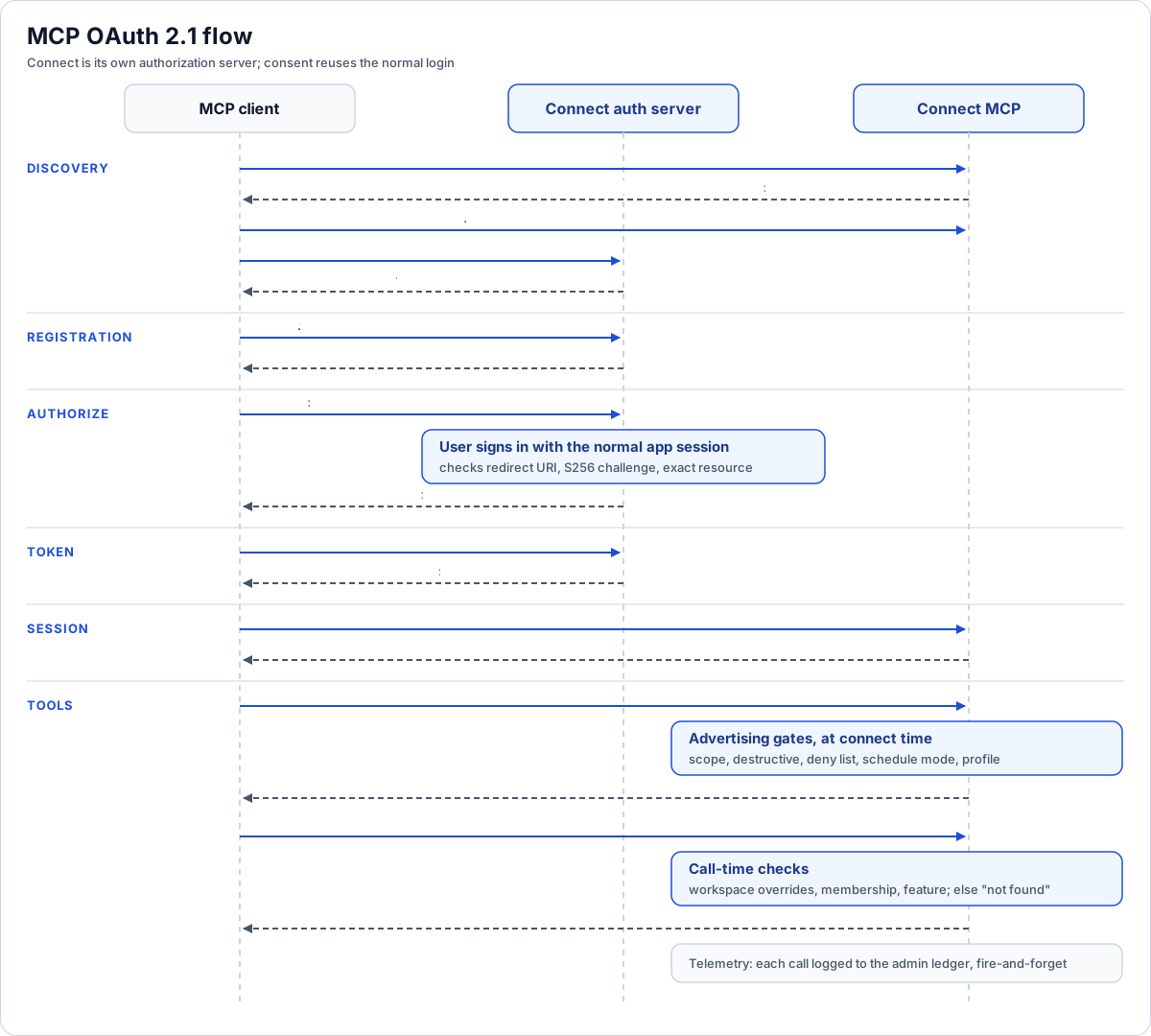
From an unauthenticated 401 to a gated tool call.
The flow, as a client sees it:
- Unauthenticated call. The client calls the MCP endpoint without a token. The server returns 401 with a WWW-Authenticate header that points at the protected-resource metadata and lists the two scopes.
- Discovery. The client fetches the protected-resource document under .well-known (it names the resource and its authorization server), then the authorization-server document (authorize, token and registration endpoints, code flow only, public clients only, S256 only).
- Dynamic client registration. The client registers itself. We accept public clients only, with one to ten redirect URIs. Each URI must be HTTPS, except loopback HTTP for local tools. The client id we return is not a database row. It's a signed blob containing the redirect URIs and a one-year expiry. Registration writes nothing to the database, so a flood of registrations costs us nothing.
- Authorize. The browser lands on the authorize endpoint. If there's no valid app session, the user is sent to the normal login page with a return-to back to authorize. Once signed in, the server checks the redirect URI against the signed client id. It requires S256 PKCE with a well-formed challenge. It also requires the resource parameter, if present, to be exactly this server's MCP URL, so a token can't be minted for some other audience.
- Code. The authorization code is a signed grant: user, client, redirect URI, PKCE challenge, scope, resource, and a ten-minute expiry. It's also registered as a short-lived session, so it can be redeemed only once.
- Token exchange. The client sends the code and its PKCE verifier. The server checks the signature, client, redirect URI and hashed verifier, then consumes the code's session. It returns a bearer token with a recognizable prefix that wraps a signed grant of user, scope and expiry. The lifetime is 24 hours.
Signed, but not purely stateless
The tokens are self-describing and signed with HMAC, and each token kind mixes a distinct purpose string into the signature. A client id can't verify as a code, and a code can't verify as an access token. But the access token is also registered in the same session store the web app uses, and every request checks both. The signature proves what the token says. The session row proves it hasn't been revoked. Signing out or killing a session in the app kills the MCP token too. You pay one indexed lookup per request for that, and we think it's worth it.
One migration detail is worth copying. Tokens issued before write support existed were opaque strings. They still resolve until they expire, but always as read-only, so an old token can never pick up the new write capability.
Streamable HTTP with sessions, and the sticky-routing catch
We run the session-ful Streamable HTTP transport, not the stateless one. The reason is elicitation. To ask the person a question mid-tool (the guided Info Sheet interview does this), the server must be able to send requests back to the client, and that needs a session.
- A session is created on initialize and keyed by the Mcp-Session-Id header on later requests. GET opens the server-to-client event stream. DELETE ends it.
- A session belongs to the user who opened it. The bearer token is still checked on every request, and a session id presented with another user's token is rejected.
- Sessions live in an in-process map, capped at a couple of hundred. Sessions idle for 30 minutes are swept whenever a new one is created. At the cap, new sessions get a 503 with a "try again shortly" message instead of exhausting memory.
- An unknown or expired session id gets a 404 telling the client to re-initialize.
The catch is the in-process map. It assumes one server instance, or sticky routing at the load balancer. A multi-instance deployment without sticky sessions would send a session's second request to a node that has never seen it. We documented that in the code rather than building a shared session store we didn't yet need.
Elicitation is also optional on the client side. The interview tool checks the client's declared capabilities. If the client can't elicit, the tool returns the current state and points the agent at the turn-by-turn tools.
Deciding what gets advertised
About two hundred tools is too many to hand every client, and some should never be handed to any client. Every registration, inline or modular, goes through one wrapper around registerTool. That wrapper asks a single function whether the tool should exist on this server:
| Gate | Rule | Why |
|---|---|---|
| Destructive | Never advertise a tool annotated destructiveHint, or named delete_, remove_ or uninstall_ | A product rule: the connector can create, edit and approve, but never delete. We check both the annotation and the name, so forgetting one doesn't leak a delete |
| Deny list | An admin-maintained list of tool names, always applied | Hide one problem tool without touching anything else |
| Schedule mode | The server-side Schedule Builder agent tools and the build-it-yourself tool are mutually exclusive | So an A/B comparison of the two build paths is clean |
| Profile | "core" (default) advertises a curated workflow happy path. "full" advertises everything that passes the gates above | Fewer tools means better tool choice for the calling model |
Reversible controls are not deletes. Revoking a share link or untagging an asset passes the destructive gate.
The server instructions sent at initialize change with these gates. They describe the pipeline in order: locate scope, ingest documents, Project Info Sheet, Means & Methods, build the schedule, review and approve the baseline, publish an Update. Step five reads differently depending on whether the Schedule Builder agent is on. If the core profile is active, the instructions say more capabilities exist on the full profile.
Runtime overlays: global, then per workspace
The gate's inputs start as deployment defaults. Two database overlays sit on top:
- A global overlay: a singleton table whose primary key is a boolean fixed to true by a CHECK, so it can only ever have one row and every write is an upsert. Columns are nullable. Null means inherit the default. The disabled-tools list is always applied.
- Per-workspace overrides that can only restrict. This is the subtle part. The advertised tool list is fixed at connect time, and it doesn't depend on a workspace, because the member MCP isn't bound to one. Every tool takes an explicit workspace id. So a workspace override can't change what's advertised. It's enforced at call time instead. Once the workspace id is known, the wrapper refuses a tool that the workspace disables, or a Schedule Builder agent tool in a workspace where the agent is off. There's no per-workspace profile, because the profile only means something at connect time.
The overlays are cached for 15 seconds. Building a server stays synchronous. It reads the cache and, if the cache is stale, starts a background refresh without waiting for it. A change made through the admin API refreshes the cache immediately. The 15-second window only bounds staleness for changes made from another process.
Gates that say "not found"
Inside each tool, access checks match the HTTP routes: membership first, then the feature the tool needs. Reaching a feature is enough to use it. Admin-level tools need the feature at its higher level. A missing feature is reported as "workspace not found", not "forbidden". A client learns nothing about what a workspace contains that the user can't see. The server instructions tell the calling model to expect this, so it doesn't loop retrying.
Long work, retries and composite tools
- Detached agent turns. A schedule build can run for many minutes, longer than a typical client idle timeout. Agent turns started over MCP run on an abort signal that never fires. A dropped transport doesn't kill a live build. The runtime's own wall clock is the limit. A heartbeat sends progress notifications to keep the client's idle timer from firing, and the result can be collected by polling a matching status tool. Only elicitation prompts get a timeout, because a person shouldn't hold a request open forever.
- Idempotency keys. Create tools take an optional idempotency key. A retried call within ten minutes returns the first result, even if that result is still in flight, instead of creating a duplicate project. The store is in-process, so it covers quick retries but not restarts.
- Composite workflow tools. A handful of tools chain several module calls for common flows: full intake, generating a schedule from intake, publishing an Update with a share link, a baseline quality report. Each one returns a steps array with ok, failed or skipped per stage, so a partial failure is easy to read instead of an opaque error.
- Telemetry. Every advertised tool is wrapped to record its name, status, duration, user, workspace and project in the admin ledger. Arguments are recorded only as a hash plus a short preview, with free-text and payload fields replaced by a size note. Recording is fire-and-forget and can never change a tool's result.
Prompts and resources
Beyond tools, the server publishes seven prompts that start common workflows (run an intake, build a schedule, draft an Update, build an app, and so on). It also publishes resources under a connect:// scheme. Global markdown resources cover domain vocabulary, product purpose, the workflow guide, schedule quality standards and the scheduling SOPs. Workspace-scoped resource templates expose corpus metrics, an intelligence brief and schedule patterns, and each read goes through the same membership and feature checks as the tools. The instructions point at these resources rather than inlining them, so the long-form guidance has one source and doesn't drift.
A second, read-only MCP for executives
Super-admins get a separate MCP server for observability: traces, conversations, usage, tool usage, MCP usage, active configs, eval sets. It has its own OAuth endpoints and a path-suffixed well-known, so clients discover it as a separate authorization server. It has one read scope, a different token prefix, and different HMAC purpose strings, so a member token can never verify there and the reverse. An operator-domain allowlist is checked at authorize time and again on every token resolve. It uses the stateless transport because it never needs to send requests back to the client. It can't change config. Changes stay in the web dashboard, where they're versioned and audited.
Why this matters if you're building something similar
- Be your own authorization server when your users already log in to you. Discovery, dynamic registration and PKCE are a few hundred lines, and consent reuses your existing session.
- Sign tokens and keep a revocation row. You get self-describing tokens and a working "sign out everywhere".
- Gate at registration, not just in handlers. If a tool is never advertised, a client can't call it. Put every gate in one function.
- Enforce per-tenant restrictions at call time. If the advertised surface doesn't depend on the tenant, restrictions have to wait until the tenant id is known.
- Detach long work from the transport. Progress notifications and status polling beat timeouts that cut off real work.
- Write down your scaling assumptions. An in-process session map is fine as long as everyone knows it needs sticky routing.
Where to go next
- The series overview: How we built Connect, an enterprise AI platform
- How the same agents pause and resume inside chat: Multi-agent delegation with pause and resume
- The tool registry behind the in-app agents: The agent tool manifest and permissions
- Other non-cookie credentials in the same app: Headless auth with personal access tokens and embed tokens
- The executive side of governance: An executive admin portal for AI agents
Thinking about exposing your own platform to Claude? Tell us what you want to build.
Frequently asked questions
Should a SaaS product be its own OAuth authorization server for MCP?
If your users already sign in to you, yes. Discovery documents, dynamic client registration and S256 PKCE are a modest amount of code, and consent reuses the existing login page and session.
Are the MCP access tokens stateless?
They are signed and self-describing, but each is also registered as a session and checked on every request, so signing out or revoking a session also revokes the MCP token.
Why use session-ful Streamable HTTP instead of stateless?
Elicitation requires the server to send requests back to the client mid-tool, which needs a session. The cost is that an in-process session store requires one instance or sticky routing.
How do you hide tools for one tenant when the tool list is shared?
Keep the advertised list global and enforce per-workspace deny lists at call time, once the tool's workspace id is known. Tenant overrides can restrict but never add tools.
How do long agent builds survive MCP client timeouts?
Agent turns run detached from the request, send heartbeat progress notifications, and expose a status tool the client polls to collect the finished result.
Next step
Have a workflow in mind?
Start with a readiness review: the task, the data and tools it needs, the access boundaries, and how a pilot would be evaluated.
Prefer email? charley@buildflows.ai
Get the next guide in your inbox
Field Notes: practical guides and new walkthroughs, about once a month.
Field Notes
Practical guides and new walkthroughs on construction data and automation, roughly monthly.
Keep learning
AI agents & MCP · October 9, 2026
How We Built Connect: Architecture of an Enterprise AI Platform
The pillar of our Connect architecture series: a layer-by-layer map of an enterprise agentic AI platform, the three-process shape it runs as, the design principles that kept recurring, and links to every deep-dive article.

AI agents & MCP · January 16, 2026
Building AI Agents for Construction with MCP Tools and Procore
A walkthrough of Construct.Chat: building a Procore financials agent with MCP tools, auditing every tool call, and the structure of a 735-tool Procore MCP server.

AI agents & MCP · April 29, 2026
MCP Gateway with Telemetry: How Tool Runtime Governs Agent Tools
Tool Runtime pulls many MCP servers into one governed endpoint. Here is how the gateway composes tools per API key, logs every call, and why production agents need this layer.