The first version of any AI schedule builder looks the same: give the model the drawings, ask for activities and relationships as JSON, and parse the result. It works in a demo. Then you ask for a 40-storey building and get hundreds of hand-typed rows with dangling logic and floor 17 missing because the model lost count. Fix one thing and two others break.
This article is about the engineering of the loop we built instead for the Connect Schedule Builder. If you want the product walkthrough, read how specialized AI agents standardize CPM scheduling. If you want the general landscape of AI and Primavera P6, read AI CPM scheduling with Primavera P6. Here we go one level down: what the model is allowed to write, what code does with it, how the loop decides it is finished, and what has to be true before a schedule can be approved. It is part of our Connect architecture series.
The model writes rules; code writes rows
The central decision is that the model never edits raw activities. It edits a Build Spec, a declarative description of the schedule, and deterministic code expands that spec into activities and relationships.
A spec has a few parts:
- Levels of the building, read from the drawings (cellar, ground, 2 through 40, roof).
- WBS nodes with codes, names and parents.
- Activity families: a superstructure floor, an interior fit-out floor, an elevator group. Each family has a level selector (all levels, a range, a list, or none for one-off work), a role (start, early, finish or ordinary), and a list of activity templates whose codes and names carry a level placeholder. Templates carry a duration, optional per-level overrides (a thicker transfer slab), a calendar, a milestone flag and an optional date constraint.
- Logic rules over codes with level arithmetic, the way a scheduler thinks: this floor's pour follows the floor below, and reshoring on a floor follows the pour six floors up.
- Answers, commitments, checks and waivers: decisions the user made, dates the schedule is measured against, project-specific checks, and recorded exceptions.
An illustrative fragment, written from scratch:
family "super" levels "2..40" wbs "SUPER"
  template CONC.{L}  "Pour slab L{L}"   days 4
  template SHORE.{L} "Reshore L{L}"    days 2
rule CONC.{L-1} -> CONC.{L}  FS
rule CONC.{L+6} -> SHORE.{L} FS
Expansion is pure, so the same spec always yields the same schedule. An activity's ID is its code, so what the model edits is what the user sees. And forty floors cost the model one family, not forty copies to keep consistent.
The spec is also where static validation happens. Every family must declare an external predecessor and successor, and nothing may be tied to the project start or dumped into the finish just to close an open end. Those are rejected before CPM runs.
One build: expand, schedule, gate
Each time the model finishes a pass of spec edits, code runs a build:
- Expand families and rules into tasks, WBS and dependencies. Templates for common structures (a structure template, a fit-out template, milestone sets by project type) are expanded the same way.
- Run forward and backward CPM passes over the firm's calendars.
- Check gates and attach findings, each tagged with the gate that raised it and a severity.
The gates fall into groups:
| Gate | What it checks |
|---|---|
| Logic | Network defects, overlong lags, filler "waiting" activities standing in for logic, building-wide gates holding per-floor work, per-floor families that do not run floor by floor |
| Standard | The firm's scheduling standard: ID conventions, naming, calendars, structure |
| Checks | Project-specific checks declared in the spec |
| Level of detail | The depth expected for the schedule type and project type |
| SOP | Gut-checks from the planning SOP, such as a sequence that experienced schedulers would flag |
| Commitments, health, quality | Measured, reported, and carried into the summary |
A build passes when no finding has error severity. That is the only definition of done; the model saying it is finished counts for nothing.
The build loop
The loop is the part that took the most iteration. In outline, one user turn runs like this:
- Draft pass. The model reads sources, sets up the project, and writes the spec. It has the full tool set, including file listing, drawing reads and setup tools, at full reasoning effort. A single pass is capped at 36 tool turns, enough to author a whole spec without looping forever.
- Build. Code expands, schedules and gates.
- Review the first draft. Six scope checkers and a senior-scheduler critic run in parallel over that first build.
- Repair. Gate errors and reviewer errors go back to the model as one combined repair prompt.
- Repeat build and repair until the build passes, the repair budget runs out, or the model stops changing anything.
- Finish. Save the result as a revision with a summary of size, health, how each commitment lands, open issues and any reviewer points the model declined.
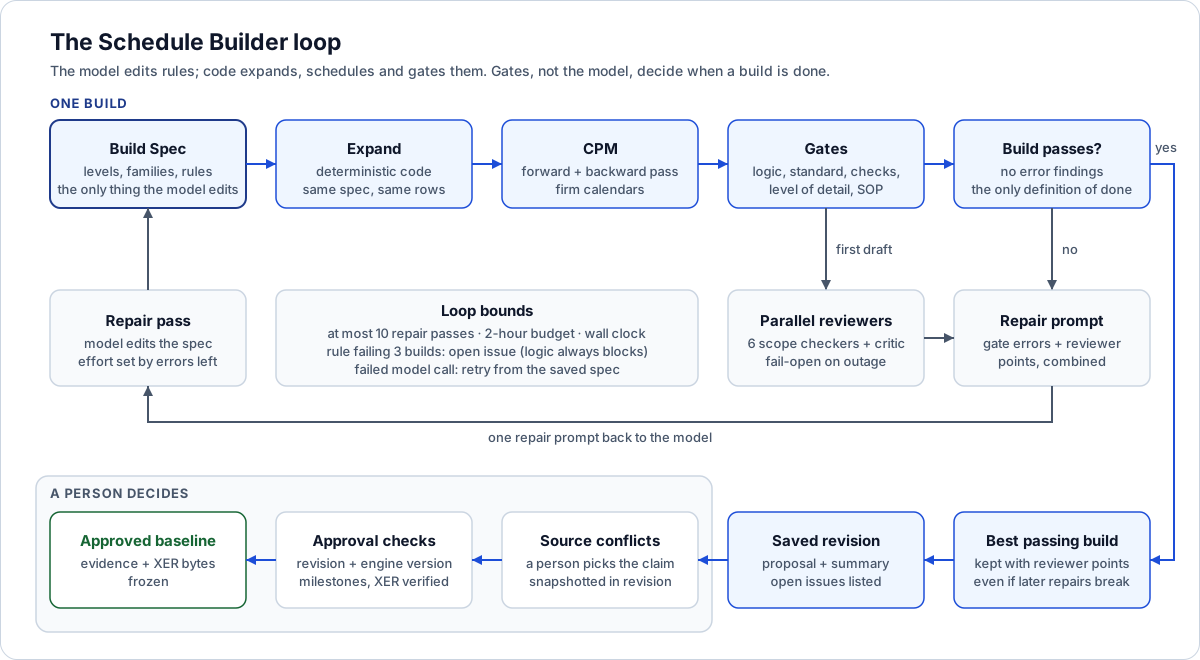
The model only edits the spec. Code builds and gates it, and a person decides what becomes a baseline.
Several details inside that outline matter more than they look.
Reviewers on the first draft, together
The six scope checkers each own an area of the building: existing buildings and demolition; foundations and structure; MEP systems and mechanical spaces; vertical transportation and logistics; interiors, amenities and special spaces; and envelope, roofs, site and certifications. Each reads the whole source text, not a summary, and lists what the sources call for that the schedule is missing. The critic reads the schedule as a senior scheduler would before it goes to an owner, with the phase spans and the controlling path to each commitment in front of it.
We run them on the first draft, in parallel, and merge their points into the same repair pass as the gate errors. Reviewing only after the gates passed meant missing scope reopened every gate and cost a second fix-and-repair cycle. A final report-only scope check runs at save time, skipped when that exact build was already reviewed.
Each reviewer is a separate agent with strict JSON schema output, medium effort, a cap on its points, and its own prompt cache key so it does not evict the builder's warm prefix. They are fail-open: if a reviewer call fails, it logs a warning and returns nothing, and the build proceeds. A reviewer outage should degrade quality, not block a scheduler's work. Cancellation is the exception; an abort propagates.
Bounded repairs and open issues
There are at most ten repair passes after the draft, inside a two-hour build budget, plus a hard turn wall clock so a hung upstream call cannot leave a conversation marked busy forever.
Some rules cannot be satisfied given the inputs, and without a release valve the loop burns every pass on one of them. So the loop counts consecutive failures per rule, keyed on the gate and a normalized message with numbers stripped. A rule from the standard, checks, level-of-detail or SOP gates that is still failing after three builds is downgraded to a warning and labelled as an open issue for a person. Logic defects never get this treatment; a broken network always blocks. Only builds after the reviewers' points were applied count toward the three, because the draft and the first review-fix pass fail by design and counting them would excuse a real flaw.
Reasoning effort is managed too. The draft, and any pass with five or fewer gate errors left, runs at full effort; bulk repairs run a step lower. At low effort each last fix tends to knock another loose, and a lower-effort draft writes a thinner schedule. After the draft, research and setup tools are withdrawn, because every strict tool schema on offer slows the model's writing.
Never lose a passing build
Repairs toward reviewer points can break more than they fix. So the loop remembers the best gate-passing build of the turn, with the reviewers' points attached. If passes run out, time runs out mid-pass, or a repair stalls, the loop saves that build and lists the reviewer points and the number of gates the later repairs broke, instead of saving the broken attempt or nothing.
If no build ever passed, a stalled spec with real content is still saved, with the blockers that need a person. A long turn should always end with something to inspect.
Retry from the saved spec
Every successful spec edit is persisted as it happens. When a model call fails on a network error, a 5xx or a rate limit, the pass is retried with backoff, up to four attempts, told that its edits are saved and to continue. Running out of tool turns is not a failure; the edits stand and the build reports what is left.
Questions are rationed
Until a baseline is saved, the builder may ask at most six questions, in no more than two rounds. Everything else is settled from the sources and the SOP's defaults, recorded as assumptions the user reviews afterwards.
Guided setup
Before the first turn, a user can fill in a guided setup: schedule type (pre-development, proposal, precon or full CPM baseline), project type, target start and required finish, calendar, WBS strategy, ID conventions, goals, an uploaded WBS outline, a target depth, and required contract milestones.
The option vocabulary lives in one module: the client renders it, the setup route validates against it, and the prompt renders the chosen values, so the UI and the builder never drift. Two fields exist to stop thin schedules passing silently: the target depth is an activity-count band the build must reach, and required milestones are checked against the built milestone set.
Source conflicts belong to a person
Drawings, specs, meeting notes and the info sheet disagree. When the builder finds two to six conflicting claims about the same item, each with its value and its source, it does not pick one quietly. A person chooses, and the decision is snapshotted into the revision: the chosen claim, who chose it, when, and the planning context it was made in. Earlier decisions on the same conflict are kept alongside.
The snapshot is validated strictly on the way in. Conflict IDs must be unique, every decision must point at a real claim, timestamps must parse, and every conflict must belong to the recorded context. Revision comparison then matches decisions by stable conflict ID, so a changed choice shows up in the diff even when no dates moved.
Running a two-hour turn without wedging the server
A build turn is minutes to hours of CPM and JSON work. Running it in the process that serves HTTP and MCP traffic blocked the event loop until status calls timed out, so the turn moved to the worker process via a schedule_builder_jobs table:
- The request process validates the message and attachments, enqueues a row and returns.
- The worker claims the oldest pending row and runs the turn.
- Clients poll status and the transcript for progress.
- A row stuck running past the turn wall clock is reclaimed to failed, so a dead worker cannot pin a conversation as busy.
The processes share no memory, so the table is the source of truth for "busy". One partial unique index is both the concurrency guard and the busy lookup:
CREATE UNIQUE INDEX one_active_job
  ON builder_jobs (conversation_id)
  WHERE state IN ('pending', 'running');
The general pattern is covered in leased background jobs on Postgres.
Approval freezes the evidence
A passing build is a draft. Approval is the point where it becomes a baseline, and it has hard preconditions:
- Expected revision. The client sends the revision it reviewed. If the schedule changed since, approval fails with a conflict and asks for a reload.
- Expected calculation version. The client also sends the CPM calculation version it saw. If the engine changed, the user must re-review dates computed by the current engine.
- Milestone links and required coverage. Required milestones must be present and tied in.
- Export verification. CPM is rerun, the XER is generated, and an independent verifier re-reads the emitted text without trusting the serializer. It catches empty dates, zero durations and column-shifted rows that a strict P6 importer rejects as corrupt.
Only then is the approval written, and it freezes everything a later reviewer would need: the health result, gut-checks, per-activity assessment, milestone and requirement coverage, the scheduled result, a verification report, and the exact XER bytes. Approving an already-approved revision is a no-op. Export of an approved revision serves those stored bytes, and if they fail the current format checks, export is refused rather than silently regenerated.
We are explicit about what this proves. Passing verification is not proof that a P6 or Syncify import will recalculate identically. A separate round-trip tool compares the exported file with one returned from a real import, and every comparison lists its own limitations, starting with the fact that the import must be independently observed.
Approval also feeds the learning engine, which is the subject of the AI learning loop from human corrections.
The alternative path: Claude-native builds over MCP
The same platform supports a second way to build. Through the Connect MCP server, an external agent such as Claude can assemble a baseline itself, guided by a baseline-builder plugin. The skill sets an order of authority (the planning SOP for company rules, current project documents for facts, user statements marked as user-confirmed, reference schedules as precedent only), keeps a local working-context file with citations to file, version and page, asks one small cluster of questions at a time, and requires explicit approval before saving the XER back to Connect. It says outright that it must not claim P6 import success until a human imports the file.
Both paths end in a saved baseline that goes through the same approval gates, so a project can be built both ways and the quality reports compared.
Why this matters if you're building something similar
- Give the model a declarative layer to edit. Rules plus deterministic expansion beat hand-written rows for anything repetitive. Determinism also makes builds diffable and testable.
- Let gates, not the model, define done. A loop that stops when the model says "finished" will ship whatever the model believes.
- Review early and merge the feedback. Running reviewers on the first draft, in parallel, and folding their points into the same repair pass saves a whole cycle.
- Fail open on advisors, fail closed on invariants. A reviewer outage should not block work. A broken network or a corrupt export always should.
- Bound everything and give impossible rules an exit. Cap passes, cap time, and convert a rule that keeps failing into an open issue for a human instead of burning the budget.
- Keep the best passing result. Repairs regress. Never let a later failed attempt overwrite an earlier good one.
- Make approval a precondition check, not a button. Pin the revision and engine version the reviewer saw, re-verify, then freeze the evidence and the exact output bytes.
Where to go next
- The Connect architecture pillar for how the Schedule Builder fits the platform.
- The AI learning loop from human corrections for the estimates this loop consumes and the learning approval triggers.
- Multi-agent delegation with pause and resume for how long agent turns survive questions and restarts.
- Two-phase AI agent workflows with human approval for the same gate pattern applied to other agent actions.
- Primavera P6 MCP server for working with P6 data through MCP.
If you are building an AI workflow that has to produce output a professional will sign, talk to us about your build.
Frequently asked questions
Why not let the LLM write schedule activities directly?
Repetitive structures like 40 floors of superstructure are where models lose count and break logic. A declarative spec with level placeholders and logic rules lets the model describe each pattern once, and deterministic code expands it the same way every time.
How does the loop decide a schedule is finished?
A build is finished when no gate finding has error severity. The model's own claim of completion is ignored. If the budget runs out first, the best gate-passing build is saved, or the remaining blockers are listed for a person.
What happens when a rule cannot be satisfied?
If a standard, checks, level-of-detail or SOP rule is still failing after three builds, it is downgraded to an open issue for a person to settle. Logic defects in the network always block.
What if a reviewer model call fails?
Reviewers are fail-open. A failed reviewer logs a warning and returns no findings, and the build continues. Hard invariants such as network logic and export verification are fail-closed.
Does passing verification mean the XER will import into Primavera P6?
No. Verification re-reads the exported file to catch defects a strict importer rejects, but import and recalculation fidelity need a recorded round trip through the real tool, which a separate comparison handles with its limitations stated.
Next step
Thinking about a scheduling pilot?
Start with one exported schedule and an agreed set of checks. We'll discuss your format, method, and approval process.
Prefer email? charley@buildflows.ai
Get the next guide in your inbox
Field Notes: practical guides and new walkthroughs, about once a month.
Field Notes
Practical guides and new walkthroughs on construction data and automation, roughly monthly.
Keep learning
AI agents & MCP · October 9, 2026
How We Built Connect: Architecture of an Enterprise AI Platform
The pillar of our Connect architecture series: a layer-by-layer map of an enterprise agentic AI platform, the three-process shape it runs as, the design principles that kept recurring, and links to every deep-dive article.

Scheduling & P6 · October 8, 2026
How Specialized AI Agents Standardize CPM Scheduling
A walkthrough of Connect, the agentic platform we built on Syncify, where one agent per step turns drawings, specs and client answers into validated, versioned CPM schedules.
Scheduling & P6 · October 8, 2026
AI for CPM Scheduling and Primavera P6: What Works Today
A practical guide to where AI helps CPM schedulers today, from evidence-backed drafts and XER health checks to governed P6 access over MCP, and how to pilot it without risking a live schedule.